LearnCard ChangeBlog #25: 7.17.26

Welcome back to another LearnCard ChangeBlog!
This release makes LearnCard easier to enter, easier to use on desktop, and more social. It introduces a rebuilt onboarding flow, a guided way to recognize peers with badges, and a desktop-focused AI Pathways experience.
LC-1963: Onboarding 2.0
LearnCard’s sign-up experience has been rebuilt as a short, guided three-screen flow.
New users provide their birthday and country, review a live preview of their profile card, and then enter the application. Names and profile images can be filled from supported sign-in providers, while LearnCard suggests an available public handle that can be edited later.
Age-related privacy settings are applied during the flow, and users no longer encounter repeated profile-completion prompts after entering the app.
Boost a Friend and Peer Badges
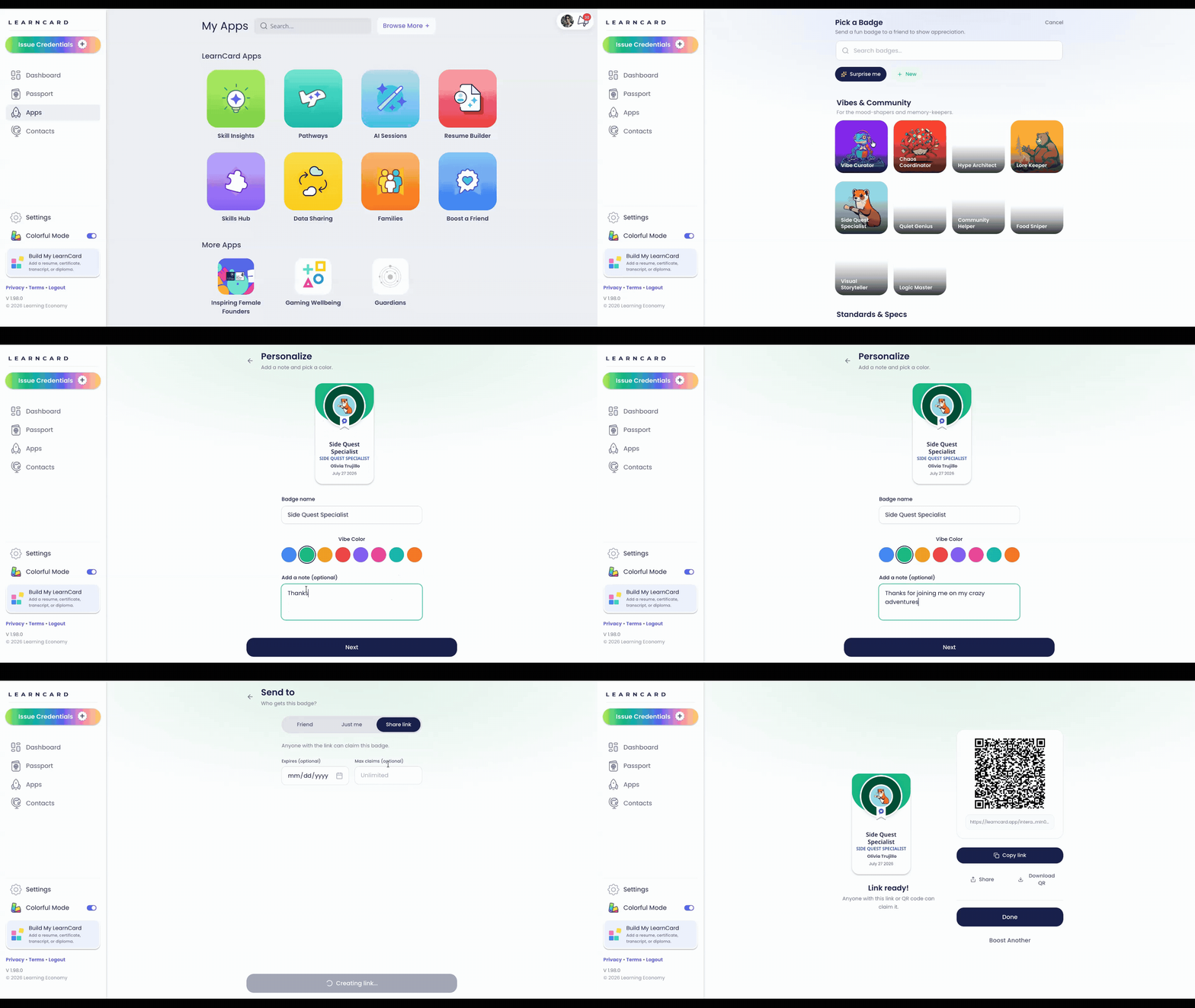
Learners can now create and send personalized recognition badges through a guided Boost a Friend experience.
Choose a badge, personalize its title, color, subtype, and note, select a recipient or create a share link, then send it. LearnCard stores the visual treatment using standards-compatible credential tags, so other Open Badges 3.0 systems can safely ignore the LearnCard-specific display hints without breaking the credential.
A follow-up integration brings badge artwork and categories from PeerBadges, making it possible to expand and update the available badge collection without releasing a new version of the app.
AI Pathways, Redesigned for Desktop
AI Pathways now makes better use of larger screens.
On desktop, My Skills Profile and Explore Roles appear in a left column, while Grow Skills occupies a wider area on the right. Courses, AI Sessions, and media use desktop-friendly grids instead of mouse-driven horizontal carousels.
The existing mobile experience remains intact.
Smaller improvements
Self-assigned skills save much faster because LearnCard no longer waits for every connected contract to synchronize before completing the save.
Credential claim pages now use a clearer full-credential layout and route learners directly to the claimed credential’s category.
Additional Bug Fest work improved notification settings, activity displays, profile settings, and App Store launch behavior.
You can view all the latest changes and bug fixes here.